

Setting up DUO Mobile for use within your home network lab or small business is a smart move for added security. DUO Mobile is SOC 2 Type II and ISO 27001:2022 certified, ensuring robust security measures. It is a remote access security solution that provides two-factor authentication (2FA) for your devices and applications. The free tier of DUO Mobile is lifetime good for up to 10 endpoints. It lacks a few of the bells and whistles an entity gets with a paid plan, but the security upsides are large even with the free plan.
What are the upsides to DUO Mobile? Why should I spend my time implementing it in my home/small business?
Well, it has massive ease of implementation. Within an hour of my home setup, I was able to deploy DUO Mobile 2FA onto multiple workstations, servers, and my VPN. Through the free tier you lose out on AD Sync capabilities, but because you are a small business or home lab connoisseur this is no biggie! While the free tier might have certain limitations compared to premium versions, it still allows administrators to configure and adapt security policies to suit their needs. Also, while it might have its limitations concerning the number of users or applications it can protect, it still provides a solid foundation that can scale as your needs grow.
2FA offers stronger security than just a password alone. It follows the fundamental logic of multi-factor authentication, something you know, something you have, and something you are. For example, DUO’s logic portrays something you know and something you have. You know your password, and you have your authenticated cell phone. Therefore, you must be you logging in.
multi-factor authentication – Glossary | CSRC (nist.gov)
Overall, DUO Mobile’s free tier provides a strong entry point into enhanced security practices without the financial commitment typically associated with such robust authentication solutions. It’s a great starting point for individuals or small setups looking to bolster their security posture without a significant investment.
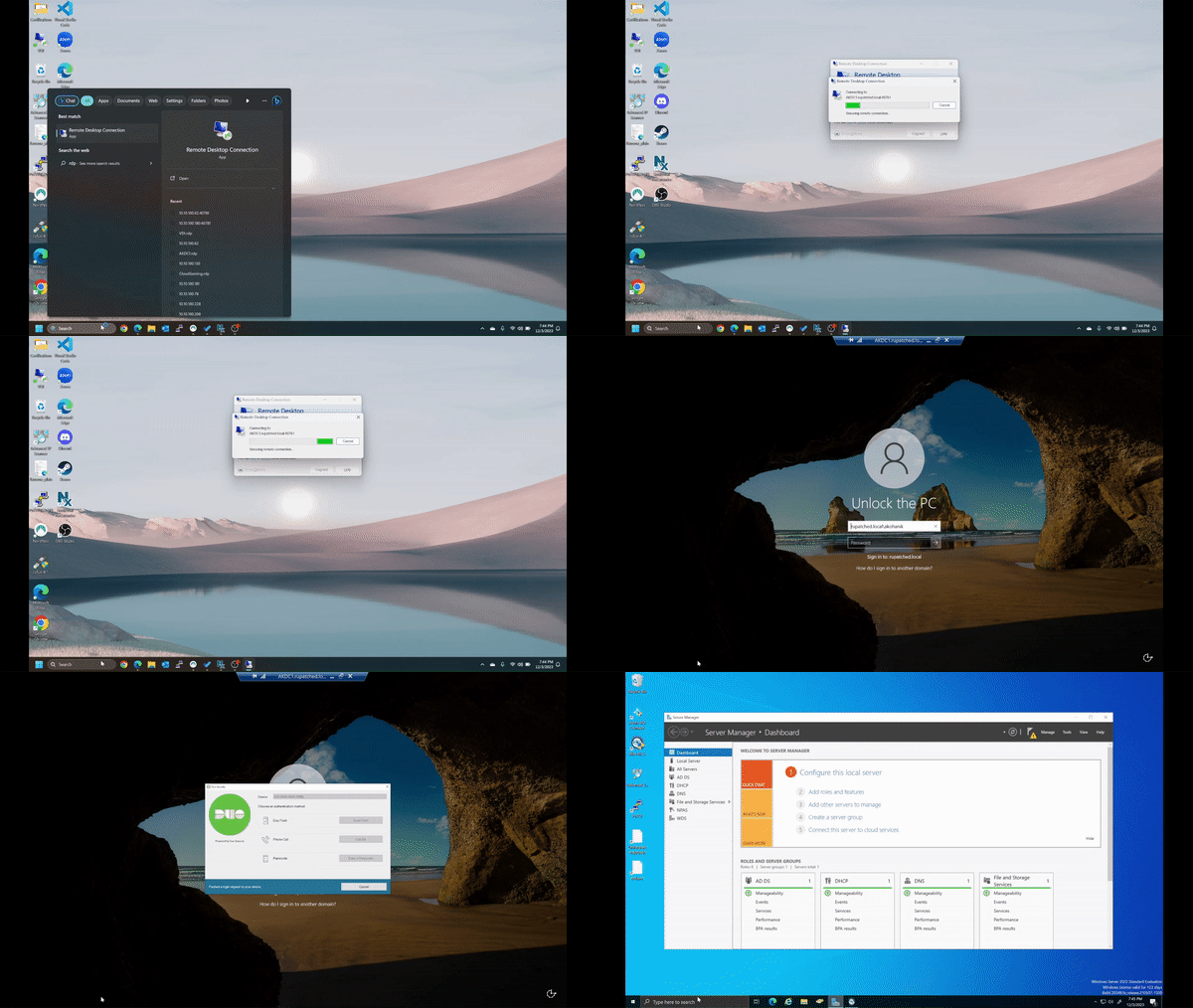
Here’s a step-by-step guide to implementing the free tier of DUO Mobile:
1.) Sign Up and Install DUO Mobile:
Go to the DUO Mobile website and sign up for a free account.
Once registered, download the DUO Mobile app on your smartphone from the respective app store (iOS or Android).
2.) Add Your Account:
Log in to your DUO Mobile account and navigate to the dashboard.
Click on “Add New Application” then “Protect an Application” and select from a predefined app such as Microsoft RDP, huntress, 1Password, OpenVPN, etc.
For this step-by-step, we’ll use Microsoft RDP.
3.) Generate Integration Key and Secret Key:
Your Integration and Secret Key will be generated and listed. Please ensure to save them in a safe place such as a password manager. The API hostname will also be listed. Be sure to save this as well.
Make sure to set your policy scope. For mine I left it as a global policy for all users. Complete the rest of the customizations such as naming your applications, adding it to a group, etc.
4.) Setup Integration:
In your home network lab, access the system or platform you want to add DUO Mobile protection to (e.g., VPN, SSH, etc.).
For Microsoft RDP, download the Duo Authentication for Windows Logon installer and run on the endpoint you’d like to protect.
5.) Configure DUO Mobile:
Choose “DUO” or “DUO Mobile” as the authentication method.
Input the integration key, secret key, and API hostname provided by DUO Mobile.
Save the settings and enable DUO Mobile as the secondary authentication method.
For Microsoft RDP, follow the DUO Mobile install wizard to completion. Input all saved keys from earlier steps. Once complete exit the machine and reinitiate/initiate an RDP connection.
6.) Test and Verify:
Log out of your system or platform and attempt to log in again.
You should receive a prompt or “push” on your smartphone through the DUO Mobile app to authenticate the login. Approve the request to complete the setup.
DUO Mobile’s certifications and security protocols, including SOC 2 Type II and ISO 27001:2022, ensure stringent compliance and reliable security measures. This two-factor authentication (2FA) solution significantly fortifies the security of your home network lab systems or platforms against unauthorized access.
Remember to keep your integration keys and secret keys secure and regularly update your DUO Mobile settings for optimal security.

 Kohanik Secure