

With a rapid changing field of cyber threats, safeguarding your home network is paramount. For me, the answer lies in Wazuh, an Open-Source Security Information and Event Management (SIEM) tool that has become the ultimate guardian of my digital realm. Its ease of configuration and robust features not only grant me peace of mind but have proven to be the unsung hero of my home IT lab.
Understanding My Home Network
Within the complex structure of my home network, diverse devices coexist, ranging from IoT gadgets like smart plugs, bulbs, and switches to high-powered servers in my HomeLab. Each category resides in its dedicated VLAN, meticulously designed for optimal security. While my IoT devices share one VLAN, my HomeLab infrastructure shares another. Featuring a NAS, Proxmox cluster, and several virtual machines including a Windows Server 2022 Domain Controller. This setup fosters an environment for creative exploration but also demands a robust security solution.
The Day Wazuh Became My Guardian Angel
One ordinary day, engrossed in testing and deploying a software package across my network, I received an unexpected notification. Wazuh, configured to run hourly vulnerability scans, detected a potential threat prompting a Slack channel alert. It turned out the newly installed software package, residing on my testing Windows Server, was outdated, and posed a security risk. Wazuh’s timely alert not only saved my endpoints from potential vulnerabilities but also emphasized its role as a proactive security measure.
Wazuh’s Features: Unveiling the Guardian Angel’s Arsenal
Out of the box, Wazuh might seem a bit unpolished, requiring additional user configuration. Yet, its capabilities are unparalleled.
Active Response: My favorite feature, Active Response acts as an Extended Detection and Response (XDR) solution. With a grasp of query language, you can trigger predefined responses, from firewall drops to host isolation, creating a dynamic shield for your devices.
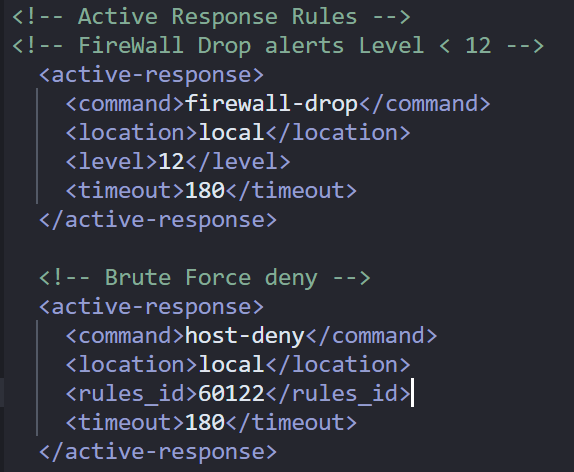
Above is an example of Two Active Response rules I have configured within my HomeLab. Check out the Wazuh Documentation if you are interested in learning more about this feature… https://documentation.wazuh.com/current/user-manual/capabilities/active-response/how-to-configure.html
Security Configuration Assessment (SCA): SCA provides a baseline security score for your endpoints operating system, advising actionable steps to enhance security. It became my guiding light in fortifying configurations, ensuring each endpoint adhered to the highest security standards.

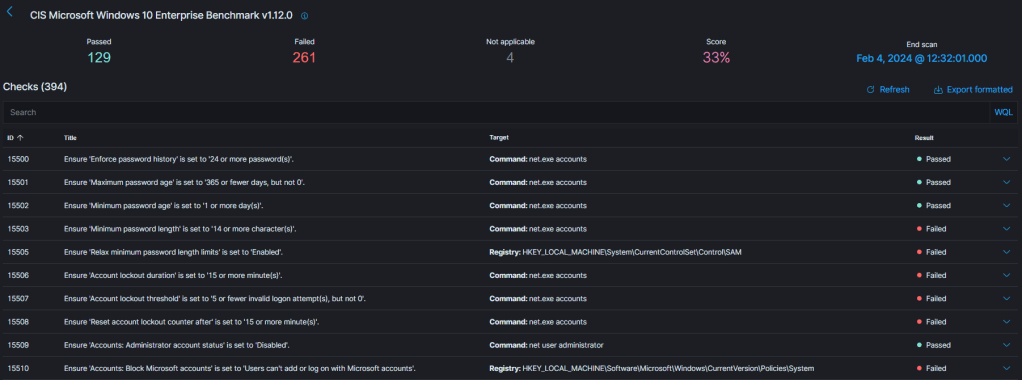
Above is an example of an SCA on one of my test windows 10 virtual machines in my HomeLab environment. Be sure to check out the Wazuh documentation if you are interested in learning more about this feature… https://documentation.wazuh.com/current/user-manual/capabilities/sec-config-assessment/how-it-works.html
Integrity Monitoring: This feature allows me to track any file changes, permissions, or content modifications on endpoints. Beyond troubleshooting, it acts as a security sentinel, alerting me to potential threats or suspicious activities.

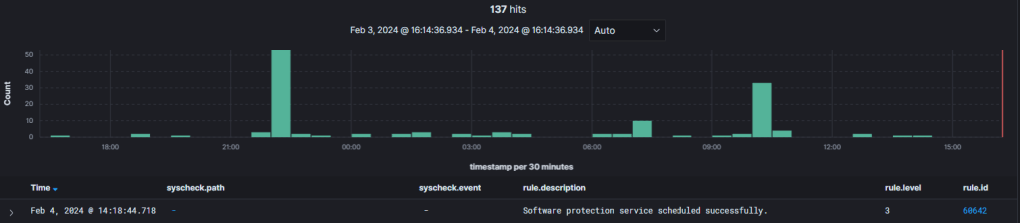
Above is an image of the Integrity Monitoring chart/an event on one of my test windows 10 virtual machines in my HomeLab environment. Be sure to check out the Wazuh documentation if you are interested on learning more about this feature… https://documentation.wazuh.com/current/user-manual/capabilities/file-integrity/index.html
Seamless Deployment and Customizability
Deploying Wazuh agents across my network was a breeze, thanks to seamless .msi deployment with tools like PDQ Deploy. The platform’s customization options, branding for Managed Service Providers (MSPs), and on-premises or cloud deployment choices add layers of adaptability to fit diverse security needs.
Click Here to learn more about setting up a PDQ Deployment Package for Wazuh.
The Wazuh Journey Continues
As I now dive into IBM’s QRadar community edition, the experience seems markedly different. Wazuh, with its almost one-click deployment, has set a high bar. I’m eager to explore how QRadar compares, overcoming setup challenges for a more extensive enterprise-level perspective.
In the ever-evolving world of cybersecurity, Wazuh stands as my loyal guardian, ensuring my home network remains a fortress against digital threats. What’s your experience with Wazuh? Share your thoughts and insights in the comments below!

 Kohanik Secure